Windows automation without the heavyweight framework Windows-Automatisierung ohne schwergewichtiges Framework

SmartKeyZ

Version 1.2

Hotkeys. Macros. Scripts. GPT. One compact Windows toolbox. Hotkeys. Makros. Scripts. GPT. Eine kompakte Windows-Toolbox.

SmartKeyZ is a lightweight Windows automation environment for everyday repetitive tasks. Record keyboard and mouse activity, assign scripts to global shortcuts, control windows, launch programs, capture screen regions and optionally combine automation with GPT.

SmartKeyZ ist eine leichtgewichtige Windows-Automatisierungsumgebung für wiederkehrende Aufgaben. Tastatur- und Mausaktionen aufzeichnen, Scripts mit globalen Hotkeys starten, Fenster steuern, Programme aufrufen, Bildschirmbereiche erfassen und Automatisierung optional mit GPT verbinden.

Freeware · Portable · No account required · No telemetry · GPT is optional Freeware · Portabel · Kein Konto nötig · Keine Telemetrie · GPT ist optional
Portable Windows application. No installer required. If your browser blocks EXE downloads, use the ZIP package. Portable Windows-Anwendung. Kein Installer erforderlich. Falls der Browser EXE-Downloads blockiert, kann das ZIP-Paket verwendet werden.
⌨ Global Hotkeys 🔴 Macro Recorder 🤖 GPT 🖱 Mouse Automation 🪟 Window Control 📸 Screenshots 📋 Clipboard ▶ Scripts 🧰 Terminal
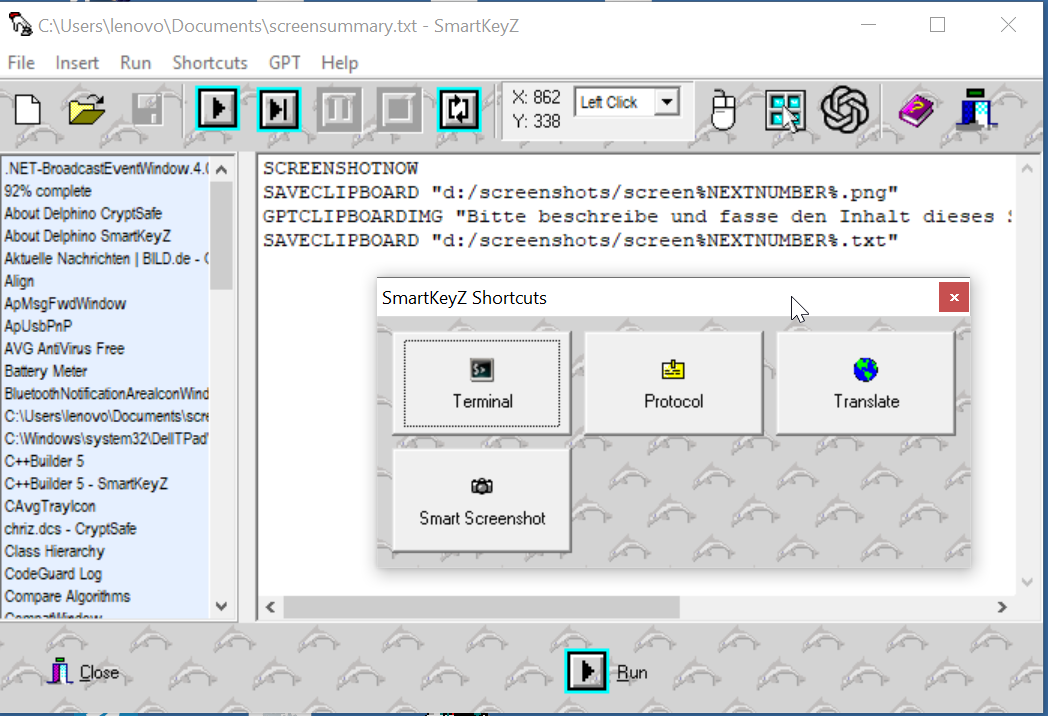
SmartKeyZ for Windows

SmartKeyZ combines a compact script editor with global shortcuts, recording, playback and optional GPT-powered commands.

SmartKeyZ verbindet einen kompakten Script-Editor mit globalen Tastenkürzeln, Aufzeichnung, Wiedergabe und optionalen GPT-Befehlen.

Automation that stays understandable. Automatisierung, die verständlich bleibt.

SmartKeyZ scripts are plain text. Record a task, edit the generated commands and assign the result to a global hotkey. SmartKeyZ-Scripts sind einfacher Text. Aufgaben aufzeichnen, erzeugte Befehle bearbeiten und einem globalen Hotkey zuordnen.

⌨️

Keyboard automationTastatur-Automatisierung

  • Type text and simulate normal keysText eingeben und normale Tasten simulieren
  • Ctrl, Shift, Alt and Win combinationsKombinationen mit Ctrl, Shift, Alt und Win
  • Repeated keys such as 5x%TAB%Wiederholte Tasten wie 5x%TAB%
🖱️

Mouse macrosMaus-Makros

  • Click, double-click and right-clickKlick, Doppelklick und Rechtsklick
  • Mouse movement and drag operationsMausbewegungen und Drag-&-Drop-Aktionen
  • Screen-coordinate based automationAutomatisierung über Bildschirmkoordinaten
🔴

Global recorderGlobale Aufzeichnung

  • Record keyboard and mouse activityTastatur- und Mausaktionen aufzeichnen
  • Window changes become script commandsFensterwechsel werden zu Script-Befehlen
  • Generated scripts remain editableAufgezeichnete Scripts bleiben editierbar

Global shortcutsGlobale Shortcuts

  • Run registered scripts from any applicationRegistrierte Scripts aus jeder Anwendung starten
  • Shortcut launcher for frequent automationsShortcut-Launcher für häufige Automationen
  • Optional autostart and system tray operationOptionaler Autostart und System-Tray-Betrieb
🪟

Window controlFenstersteuerung

  • Activate or wait for windows by titleFenster per Titel aktivieren oder darauf warten
  • Minimize, maximize, show, close, move and resizeMinimieren, maximieren, anzeigen, schließen, verschieben und skalieren
  • Combine with keyboard and mouse commandsMit Tastatur- und Mausbefehlen kombinieren
🤖

Optional GPT integrationOptionale GPT-Integration

  • Process clipboard or selected text with GPTClipboard oder markierten Text mit GPT verarbeiten
  • Insert GPT responses into the active applicationGPT-Antworten in die aktive Anwendung schreiben
  • Use text or screenshots in GPT workflowsText oder Screenshots in GPT-Abläufen verwenden
📸

Screenshots & clipboardScreenshots & Zwischenablage

  • Capture selected screen regionsFrei wählbare Bildschirmbereiche aufnehmen
  • Put captures directly on the clipboardAufnahmen direkt in die Zwischenablage kopieren
  • Save clipboard text or images using filename templatesClipboard-Text oder Bilder mit Dateinamensvorlagen speichern
▶️

Programs & terminalProgramme & Terminal

  • Launch applications and command-line toolsAnwendungen und Kommandozeilen-Tools starten
  • Run CMD commands or keep the console openCMD-Befehle ausführen oder Konsole offen lassen
  • Open Terminal in the current Explorer folderTerminal im aktuellen Explorer-Ordner öffnen
🧩

Variables & promptsVariablen & Eingaben

  • Text and numeric prompt variablesText- und Zahlenvariablen per Eingabedialog
  • Reuse command-line parameters inside scriptsKommandozeilenparameter in Scripts weiterverwenden
  • Delay, pause and conditional abort commandsDelay-, Pause- und bedingte Abbruchbefehle

Record it. Read it. Change it. Run it. Aufzeichnen. Verstehen. Anpassen. Ausführen.

The recorder creates normal SmartKeyZ commands instead of hiding the automation inside an opaque binary macro. Der Recorder erzeugt normale SmartKeyZ-Befehle, statt die Automatisierung in einem undurchsichtigen Binärmakro zu verstecken.

01 · Record
Perform the task onceAufgabe einmal durchführen SmartKeyZ watches keyboard, mouse and foreground-window activity. SmartKeyZ erfasst Tastatur, Maus und aktive Fenster.
02 · Edit
Fine-tune the scriptScript anpassen Remove unnecessary actions, change delays or add commands. Unnötige Aktionen entfernen, Delays ändern oder Befehle ergänzen.
03 · Register
Assign a global shortcutGlobalen Shortcut vergeben Give the automation a title, shortcut and optional icon. Automation mit Titel, Shortcut und optionalem Icon versehen.
04 · Run
Trigger it from anywhereÜberall starten Execute the script while another Windows application is active. Script ausführen, während eine beliebige Windows-Anwendung aktiv ist.
SmartKeyZ Scriptplain text
ACTWIN "Notepad"
TEXT "Hello from SmartKeyZ!"
ENTER
DELAY 500

%CTRL%%S%
DELAY 300
TEXT "C:\Temp\smartkeyz-demo.txt"
ENTER

Small commands, useful combinations. Kleine Befehle, nützliche Kombinationen.

The script language intentionally stays compact so automations remain easy to read and easy to generate. Die Scriptsprache bleibt bewusst kompakt, damit Automatisierungen leicht lesbar und leicht erzeugbar bleiben.

AreaBereich
Examples
PurposeZweck
Keyboard
TEXT, ENTER, %CTRL%%S%
Text, keys and shortcutsText, Tasten und Kombinationen
Mouse
CLICK, DCLICK, MOUSEMOVE
Pointer automation and drag operationsMausautomatisierung und Drag-Aktionen
Windows
ACTWIN, WAITWIN, MOVEWIN
Find and control application windowsAnwendungsfenster finden und steuern
System
EXEC, CMD, TERMINAL
Launch programs and command-line tasksProgramme und Kommandozeilenaufgaben starten
GPT
GPTTYPE, GPTCLIPBOARD, GPTCHAT
Optional AI-assisted workflowsOptionale KI-gestützte Abläufe
Capture
SCREENSHOT, SAVECLIPBOARD
Capture and save screen or clipboard contentBildschirm- oder Clipboard-Inhalte erfassen und speichern
GPT features are optional and require an API key. Only when GPT commands are used is the corresponding prompt or input sent to the configured AI service. Normal SmartKeyZ automation runs locally. GPT-Funktionen sind optional und benötigen einen API-Key. Nur beim Ausführen von GPT-Befehlen werden der jeweilige Prompt bzw. die verwendeten Eingaben an den konfigurierten KI-Dienst übertragen. Normale SmartKeyZ-Automatisierung läuft lokal.

Ready to automate the annoying little things? Bereit, die nervigen kleinen Dinge zu automatisieren?

Download the portable Windows executable and start building your first script. Portable Windows-EXE herunterladen und direkt mit dem ersten Script starten.

⬇ Download SmartKeyZ ⬇ SmartKeyZ herunterladen

About / press information Kurzinfo / Presse

Short facts for download archives, blogs and editors. Kurzangaben für Download-Archive, Blogs und Redaktionen.

SmartKeyZ is a free, independently developed Windows automation utility from Germany. It combines a plain-text macro language with global hotkeys, keyboard and mouse recording, window control, screenshots, clipboard tools, application launching and optional GPT integration.

SmartKeyZ ist ein kostenloses, unabhängig entwickeltes Windows-Automatisierungstool aus Deutschland. Es kombiniert eine einfache textbasierte Makrosprache mit globalen Hotkeys, Tastatur- und Mausaufzeichnung, Fenstersteuerung, Screenshots, Clipboard-Werkzeugen, Programmstarts und optionaler GPT-Integration.

  • Version: 1.2
  • License: Freeware / non-commercial release
  • Platform: Windows
  • Packages: EXE / ZIP
  • Installation: portable
  • Account required: no
  • Telemetry: none
  • Website: smartkeyz.net

SmartKeyZ is an independent Windows automation project. Normal automation runs locally; optional GPT commands use the configured external AI API. SmartKeyZ ist ein unabhängiges Windows-Automatisierungsprojekt. Normale Automatisierung läuft lokal; optionale GPT-Befehle verwenden die konfigurierte externe KI-API.